

Install ForPlus on iPhone and iPad
Purchase and installation walkthrough
For new subscribers
From checkout to opening the store on your device.
How do I install Plus apps on iPhone without jailbreaking?
If ForPlus is already active on your device, open it, choose an app, and tap Download. If this is your first time, follow the steps below to install the store and activate your subscription in Safari on your device without jailbreaking or using a computer.
-
1
Open ForPlus on the device you want to activate
Open ForPlus in Safari and tap Download Store.
-
2
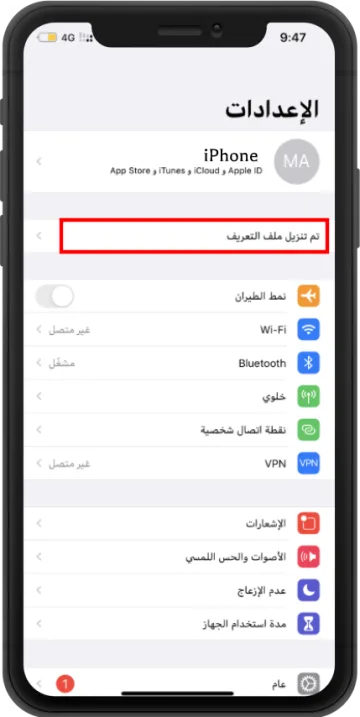
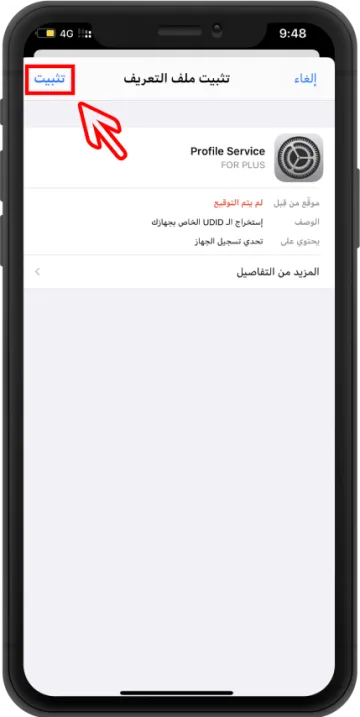
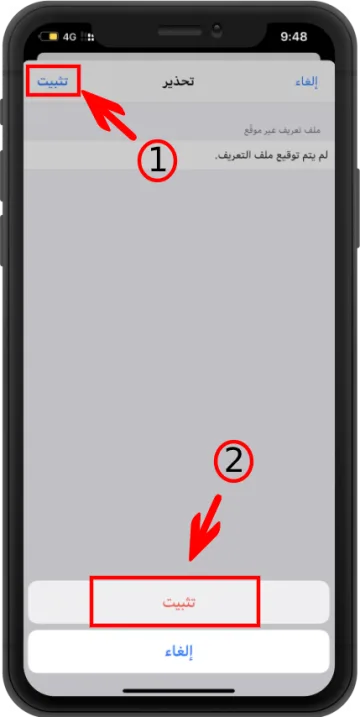
Install the profile from Settings
Open Settings, tap Profile Downloaded, then tap Install.
-
3
Complete activation
After installing the profile, return to ForPlus if the page does not open automatically. Enter your activation code and the requested details, then tap Activate.
-
4
Install the store
When your device status shows it is ready, tap Install.
-
5
Open the store
Open ForPlus, choose the app you want, and tap Download.